About 6 min readNovus Stream Solutions
Input that matches what you meant
Keyboard, controller and touch share one set of action names in Novus Striker, so the same intent gives the same result. What the current build binds, and why.
- Input
- Controls
- Feel
The release this is about
b1bdd147090b5c25, shipped September 13, 2026. Goals stop costing frames, and the ball keeps its feet.
Two input failures make a game feel unfair faster than anything else. A missed input feels like the game ignoring you. An input you did not make, or one that did something you did not ask for, feels like the game deciding for you. Neither is a matter of taste. Both are the distance between what the player meant and what happened on screen.
Novus Striker's input model is built to keep that distance small and explainable. This note describes it from the gameplay contract the current build emits, which lists every action, every binding on every device, and the rules those actions follow. If a binding is named here, the build you can play carries it.
One action language across three devices
The contract defines three control schemes: keyboard and mouse, controller, and touch. They do not have three separate sets of actions. They share one set of action names, and each scheme maps its own buttons onto those names. Move, pass, lob or chip, free pass, skill move, shoot, shove, sprint, switch player, power, item, keeper dive and pause are the same actions whichever device you hold.
That shared vocabulary is what lets the rest of the game stay honest. The tutorials, the Move Lab, the in-game control legend and the help pages all talk about the same actions, and the label on screen is the one for the device you are using. On a controller, the face-button labels adapt in-game for Xbox, PlayStation and Nintendo pads.
- Keyboard and mouse: move on WASD, pass on left click, shoot on right click, sprint on left shift, switch on tab, shove or tackle on space, and the lob and free-pass modifiers on left control and left alt.
- Controller: move on the left stick, pass on A, shoot on B, shove on X, power on Y, sprint and switch on the bumpers, and the two modifiers on the triggers.
- Touch: a left joystick for movement, labelled buttons for each action, and a skill pad for gestures, in a layout that respects the screen's safe areas.
Tap, hold, and the cost of holding too long
Most actions are a press. Pass and shoot are different: they are tap or hold. A tap gives a quick action. Holding charges it, and a release near full gives a perfect one. Holding beyond full is overcharged, and it loses the safe release instead of adding free power. The four charge outcomes walks through each one.
The overcharge rule is the important one. If holding longer always helped, the right play would always be to hold, and the charge would stop being a decision. Because overholding has a cost, the player has to judge the moment, and the result tells them whether they judged it well.
The shove button follows the same idea. Tap it and your player shoves. Hold it and they commit to a charged tackle, with explicit states for the hold, the release, the hit, a stumble and the get-up. Press it under a high ball and they contest it in the air. One button carries three intents, and how long you hold it says which one you meant.
One recognizer for every gesture
Skill moves are gestures: bursts, directional cuts, half-turns, full spins and shielding. On a controller they come from the right stick. On keyboard and mouse they come from a right-mouse drag, or from space while carrying the ball. On touch they come from the skill pad. The contract states that all three feed one recognizer with the same thresholds, so a cut is a cut however you drew it. Skill moves and shielding covers each move.
A single recognizer matters for fairness in local play. Two people on the same couch, one on a pad and one on a keyboard, are being judged by the same rule. Neither device has a secret easier threshold.
Assistance that you can see
Shooting uses a nine-zone goal: assisted aim selects a three by three target from low left through high right. With a mouse the aim projects onto the goal. With a controller the aim is relative to the camera and falls back to the way your player faces when the stick is neutral. The contract records the input, the charge, the assistance and the selected zone before the ball is launched. Nine-zone shooting explains how to aim on each device.
Passing works the same way. An assisted pass reserves a receiver and a predicted arrival, and that reservation stays in charge until the pass resolves one way or another: a trap, a redirect, a finish, an interception or a miss. The receiver you meant is the receiver the game is working towards, and an interception is still possible because the defence is real.
One-timers and aerial finishes follow a rule worth stating plainly. Ball position and action timing choose the finish. The animation never awards it. A header happens because the ball was where a header could meet it, not because a canned move played.
No hidden help
The design rule the team works to is that difficulty should change how computer-controlled players decide and how much risk they take, never hand one side a hidden physics advantage. Two parts of that rule are already fixed in the contract. Every kind of goal is worth exactly one, including a Power Strike and a goal from an item. And overholding a charge costs you the safe release rather than adding power, so there is no input that is simply better than playing well. The assistance that exists, on passing and on shooting, is named in the contract and described in the guides.
Remapping, and knowing what you pressed
Remapping, touch scaling, reduced effects, reduced motion and colour-vision palettes are all available in the current build. The controls surface always shows all three input schemes, and rebinding works with mouse, keyboard, pad or touch rather than being a mouse-only screen. The in-game control legend opens with H. It used to use F1, which the browser also claims. The controls section of Help has the full reference.
Local multiplayer adds one more rule. Local co-op and versus require each device to join explicitly, pick a side and ready up. A laptop no longer invents extra local players before filling the remaining slots with computer-controlled ones, and the contract gives device ownership explicit connected, assigned, disconnected and reconnecting states, so a pad that drops out is a visible state rather than a guess.
What this note does not claim
It does not claim touch is equal to a controller: the contract says it is not, and names the two actions touch leaves out. It does not claim every haptic or rumble cue is final. And it does not claim that a missed input is never the game's fault. If the player on screen does something you did not ask for, that is a bug worth reporting, with the device, the binding and the moment it happened.
Try it
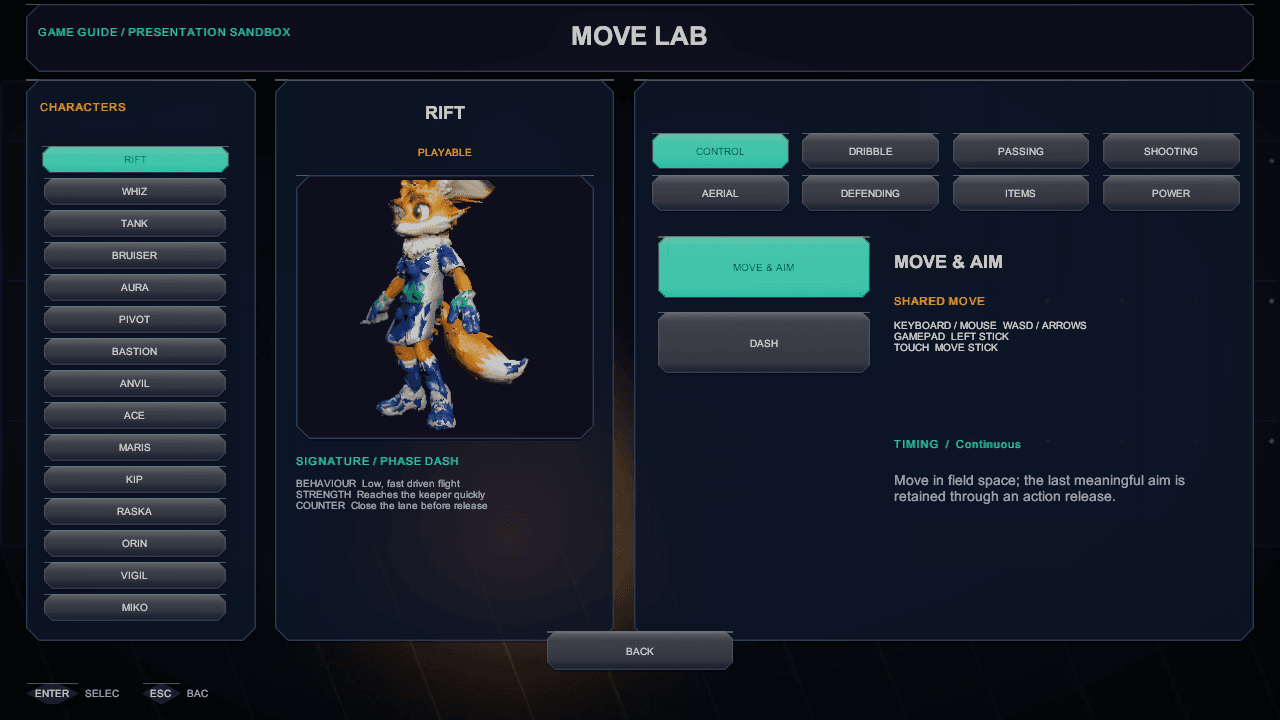
- Read what the Move Lab covers, then open it in the game, pick an athlete and read the bindings for the device you are holding.
- In a Quick Match, tap pass, then hold pass to full, then hold it past full. You should feel three different results.
- Draw the same cut with the right stick and with a right-mouse drag. It should come out as the same move.
- Press H during a match and check the legend matches the buttons you have been using.
If each step behaves as described, the input model is doing what it claims: one intent in, one explainable action out.
The short version
Input that matches what you meant
A sixteen-second captioned summary of how the current build turns one intent into one action on every device.
Transcript
- 0:00Keyboard, controller and touch share one action list.
- 0:04Tap for quick, hold to charge, overhold at your own risk.
- 0:08One recognizer reads every skill-move gesture.
- 0:12Remapping and accessibility settings stay visible.
Where to check this
Nothing above is written from memory. These are the pages and records each claim comes from.